6 Dungeon & Battle Map Editors Compared
A dungeon and battle map editor is the hand-driven counterpart to a dungeon generator: a tool for drawing or editing a tactical-scale map directly (walls, floors, doors, terrain, furniture), usually with a grid and usually with an export aimed at a virtual tabletop. Some editors also include built-in random generation as a starting point; per the comparison taxonomy on this site, a tool with both generation and editing is classified as an editor when the editing surface is its primary purpose.
TTRPG map tools split along three axes: generator vs. editor (an editor with generation features is an editor first), scale (world, region, settlement, tactical), and sub-type within each scale (caves vs. dungeons vs. battle scenes vs. buildings at the tactical scale). On the generator side, tools tend to specialize per sub-type. On the editor side, those sub-types collapse: dungeons, caves, battle scenes, and building interiors are all built in the same generalized tactical-map editor, which is why this article covers them all together. See also Dungeon Map Generators Compared for the generator counterpart at this scale, and Settlement Map Generators Compared for the next scale up.
The main differentiators across this set are deployment (browser vs. desktop), visual style (asset-heavy painted vs. hand-drawn ink vs. clean tile), VTT export pipeline, and whether a built-in generator can produce a starting layout to edit from.
Inkarnate
Top-Down, Dungeon, and Perspective Modes

*
*
*Inkarnate is one browser app with three tactical-scale editing modes, each surfaced as a distinct tool here. The Battle Map Maker builds top-down grid-based battle maps using terrain textures, wall and floor stamps, furniture, foliage, water features, and dungeon and outdoor asset packs. The Dungeon Map Maker is a parallel mode tuned for underground scenes, with the Classic Dungeon style providing stone floor textures, wall brushes, traps, doors, chests, and underground environmental stamps. The Perspective Battle Map Maker is the most visually distinctive of the three: it produces 3/4 angle maps with wall-height illusion, pillars, furniture, and architectural depth cues, giving dungeon interiors and rooms a sense of three-dimensionality that top-down maps can't.
The strength is the asset library and the painted aesthetic, both of which are subscription-gated for the full set. Inkarnate is the option to choose when the map needs to look produced and the GM wants to spend creative effort on composition rather than on sourcing assets.
Dungeon Scrawl
Hand-Drawn Aesthetic, Browser-Based

*
*Dungeon Scrawl is a browser-based editor that produces maps in a quick Dyson-style hand-drawn aesthetic. The toolset includes a wall tool, rectangle and polygon room tools, floor textures and styles, doors, stairs, furniture, text labels, fog, and basic lighting. The free tier provides full access to the editor and basic export; the Pro tier adds commercial-use export, additional style packs, advanced VTT export formats, and a Roll20 "Send to Tabletop" integration that pushes the map directly into a Roll20 game.
The structural appeal is speed and look: a usable hand-drawn map can be assembled in minutes without sourcing assets, and the output style is widely recognizable from the broader Dyson-influenced cartography community. This is the option for GMs who want a Dyson-flavoured map without committing to a desktop install or an asset subscription.
Dungeon Map Doodler
Browser Drawing with Built-In Random Generation
*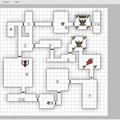
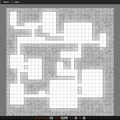
*Dungeon Map Doodler is a browser-based map drawing tool with two coexisting versions: the current editor and a Classic version retained for users who prefer its older UI. Both versions cover snap-to-grid drawing, free-draw and dynamic brushes, foreground and background layers, stamps for doors, stairs, and furniture, room and shape tools, a font tool, and a wall tool, with PNG export and customizable grid settings. Both also include built-in random dungeon generation and donjon map import, meaning a Donjon-generated layout can be brought in and then hand-edited.
The notable feature versus other browser editors is the embedded random generator: a GM who wants to start from a generated layout and then customize it can stay inside Dungeon Map Doodler for the whole workflow rather than moving the map between tools.
Dungeondraft
Desktop Editor with Generator and VTT Pipeline
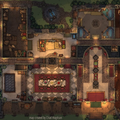
*Dungeondraft is the paid desktop heavyweight of this set. It supports terrain and landscape painting, walls and tiles, scattered objects, and grid-aligned lighting configuration. A built-in random dungeon and cave generator produces a starting layout that the GM then hand-edits, which is why it sits on the editor side of the taxonomy rather than the generator side. A tag system organizes assets, and a printer-friendly export filter strips effects for tabletop printing.
The export pipeline is the strongest practical differentiator: Dungeondraft writes the Universal VTT format consumed by Foundry VTT, Roll20, MapTool, Arkenforge, Fantasy Grounds Unity, Encounter+, and D20Pro, so a single map ships across nearly every digital tabletop. The tool is extensible via a GDScript-based modding API and is compatible with third-party asset packs from cartographyassets.com and various Patreon creators, which means the asset ceiling is effectively limitless.
Deepnight RPG Map Editor 2
Clean Hand-Drawn Tile Editor
*RPG Map Editor 2 takes a deliberately RPG-agnostic approach: it uses generic hand-drawn tiles for halls, walls (including diagonals and cavern surfaces), objects, pools, grounds, and stairs rather than committing to specific furniture models. Features include raycasted lighting, multiple map skins, text and icon annotations, and automatic legend-block generation that produces a labelled key from the map's annotations.
A useful cross-tool detail: it can import maps from Watabou's One Page Dungeon, so a generated one-page dungeon can become the starting point of a hand-edited final map. The clean simple interface and the focus on generic shapes make it well suited to GMs who prefer a sketched look over a painted one.
Kassoon
Map Maker
*Kassoon's Map Maker is the lightest-weight editor in this set: a browser tool for drawing terrain, placing objects and tiles, and producing printable D&D maps. It sits inside the broader Kassoon toolset alongside encounter, treasure, and dungeon generators, so it benefits from sharing a context with adjacent prep tools.
The simpler feature set makes it most useful for quick custom maps where the GM doesn't need VTT-export, multi-layer assets, or a built-in generator, for example a hand-drawn tactical scene for a one-off encounter that won't be reused.
Choosing an Editor
Inkarnate is the most production-ready choice for a polished painted aesthetic, with a large asset library and three viewing modes (top-down, dungeon, perspective). It's also the only option in this set with perspective maps. For a quick Dyson-flavoured map built entirely in the browser, Dungeon Scrawl is the fastest to start with, and the only editor here with a direct Roll20 integration. Dungeon Map Doodler covers the workflow that mixes random generation and hand-editing inside one browser tool, more self-contained than any peer. Dungeondraft is the heaviest desktop option, with the deepest asset extensibility and a Universal VTT export that targets nearly every digital tabletop. RPG Map Editor 2 fits a niche: a clean hand-drawn tile aesthetic, with the useful trick of importing Watabou's One Page Dungeon as a starting point. And Kassoon's Map Maker is the lightest browser tool here, bundled alongside other prep generators.