5 Worldbuilding Calendars Compared
A calendar tool helps you answer a question that comes up constantly in a campaign: what day is it, and what's happening in the sky? Most fantasy worlds don't run on twelve months and one moon, so these tools let you build a calendar with whatever month names, week lengths, and lunar cycles your setting needs. They fall into a few distinct shapes. Some are generators that produce a finished calendar or almanac you read off. Some are trackers that hold an in-campaign date you advance as you play and annotate with events. And some are calendars baked into a larger worldbuilding platform or virtual tabletop. Which shape you want depends on whether you're prepping a setting, running sessions, or doing both.
Donjon
Procedural Calendars With Auto-Generated Celestial Events
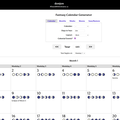
*Donjon's tool is a generator first. You set the number of months, the days in each month, the days in a week, and up to thirteen moons, each with its own cycle length and starting phase. It ships with presets for Earth, Eberron, Golarion, and Greyhawk, plus a Random option, so you can start from a known setting or roll something new. The output is a full year laid out month by month.
It also fills the calendar with celestial events on its own. With the option enabled, days get tagged with moon phases for each moon plus occurrences like solar eclipses, meteor showers, comets, auroras, and shooting stars. That makes it useful as a ready-made almanac, not a blank grid you have to populate yourself. You can render the year as a block grid, a vertical list, or plain text.
It saves through a Save/Restore tab that writes the whole calendar to a file or to a copy-paste code block, and that saved data does include a per-day notes field. There's no login and no running date to advance, though, so it's better suited to generating and exporting a calendar than to tracking time across sessions.
Kassoon
A Date-And-Time Tracker You Annotate As You Play
D&D 5eKassoon's calendar is built around a live date. Year, month, and day controls sit at the top alongside a clock with buttons to push time forward by minutes, hours, or eight-hour blocks, plus shortcut presets for things like searching a room or picking a lock. It's designed to hold "now" in your campaign and move it as events unfold.
The customization runs deep behind a "show options" panel: months per year, days per month, days per week, which weekday the year starts on, and multiple named moons with individual cycle lengths and starting phases. Like Donjon it can scatter celestial events across the year, and it ships with Earth, Forgotten Realms, and Greyhawk presets. The difference is that any day is click-to-edit, so you can type campaign notes directly onto the date they happen.
Calendars can be titled and saved, loaded, or deleted, with a Public toggle that exposes them in a shared list, and saving is tied to an account. The site is free and supported by ads, with a Patreon premium tier that removes them. If you want a calendar that lives alongside your sessions and accumulates your own notes, this is the most session-oriented of the standalone web tools.
World Anvil
A Calendar Wired Into Timelines And Maps
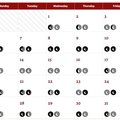
*World Anvil's calendar isn't a standalone page; it's one feature inside a full worldbuilding platform. You define custom months and day names, irregular month lengths, recurring festivals, and multiple moons or other celestial bodies. The calendar also feeds the rest of the platform, connecting to the timeline maker and the Chronicles feature, which overlays timelines onto maps.
If you're already documenting your world's history, factions, and geography in one place, the calendar slots those events into a chronology rather than sitting on its own. It's a better fit for long-form worldbuilding and writing than for quick at-the-table date tracking.
Using it requires an account. There's a free tier (Freeman), with paid memberships running from around $7 to $34 a month that raise limits and unlock more features. Compared to the single-purpose generators here, it asks for more setup and commitment, in exchange for keeping the calendar tied to everything else about your world.
Fantasy Grounds
An In-VTT Calendar Tied To The Game Session
*Fantasy Grounds is a virtual tabletop, and its calendar is a component inside that desktop application rather than a web tool. It tracks the current campaign date, supports loading a custom calendar per setting, and logs dated events as part of the running game. You reach it by installing the app, which is available for Windows, Mac, and Linux.
Because the calendar lives in the same program where you run combat, manage characters, and share maps, the date is connected to the actual session, not kept in a separate tab. That's the advantage if you already run your games in Fantasy Grounds, and largely irrelevant if you don't.
The application itself downloads for free, but it sits behind a larger paid catalog of licenses and content. Unlike the browser tools here, there's nothing to try in a tab; evaluating it means installing the VTT. Consider it the right choice mainly when you're already inside, or planning to adopt, that platform.
Roll for Fantasy
A Lightweight, No-Login Custom Calendar
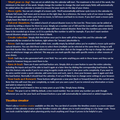
*Roll for Fantasy's Calendar Creator is the most pared-down of the standalone generators. You set the number of months, days per week, and the names of both, then click Create Calendar to build the grid. It defaults to a simple four-month, three-day-week layout starting in the year 2000, and you expand from there.
Despite its simplicity it covers the essentials: up to three moons (white, blue, and red) with custom cycle lengths, an optional random-natural-disaster chance, and a large icon palette for marking days with events, weather, moon phases, or hazards. Every day also gets a resizable text field for notes, and Year Back and Year Ahead buttons step through years. It draws no distinction between generating and tracking; it's a grid you fill in by hand.
Saving uses four local slots stored in your browser instead of an account, so a calendar persists on the same machine but won't follow you elsewhere, and clearing your cache wipes it. There's no login and nothing to pay for. If you want to spin up a custom calendar quickly without signing into anything, it's the lowest-friction option.
Choosing a Calendar
The choice comes down to what you're doing with the calendar. If you want a finished, populated year with moon phases and celestial events generated for you, Donjon produces that with the least effort and exports cleanly. If you want to hold a live date and annotate it as your campaign moves, Kassoon's editable days and time controls make it the most session-friendly web tool, while Roll for Fantasy offers a simpler, no-login grid you fill in yourself. If the calendar needs to connect to a broader record of your world's history and geography, World Anvil ties it into timelines and maps at the cost of an account and, for the fuller feature set, a subscription. And if you already run your games in Fantasy Grounds, its built-in calendar keeps the date attached to the session itself rather than living in a separate window.