7 GM Screens Compared
A GM screen is the reference a game master keeps in front of them while running a session. The physical version is a folding cardboard barrier with rules tables printed on the inside; the digital versions collected here drop the cardboard and keep the reference, usually adding things paper never could: search, live initiative tracking, your own campaign notes, or full statblock lookups. They fall into two broad groups: dashboards you actively interact with during play, and static references you consult. Some are tied to one rules system, some work with any. This article compares seven of them, starting with the standalone interactive screens, then the ones built into larger campaign suites, and finishing with the pure references.
5e.tools
A Modular Panel Grid for D&D 5e
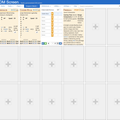
D&D 5eThe 5e.tools DM Screen is a blank grid you fill with panels. Each cell has a "+" that opens a picker with tabs for Content, Rules, Adventures, Books, Image, Embed, and Special. Through it you can drop a creature statblock, a spell, an item, a condition, a rules section, a random table, or an arbitrary page from a book or adventure into any panel, alongside images and web embeds.
Panels are dragged and resized freely, and tabs along the side let you keep several separate boards, for example one for a dungeon and another for a town. A built-in initiative tracker panel holds a list of combatants with editable name rows and add, print, and reset controls. Layouts are saved in the browser and can be exported as JSON or shared by URL.
It is free, runs in the browser with no account, and draws on the same large 5e database as the rest of the 5e.tools site. The trade-off is that the screen starts empty: it rewards GMs willing to assemble and arrange their own board, not one handed to them ready-made.
Kassoon
A Build-Your-Own Screen of Generators
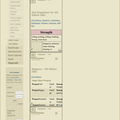
D&D 5eKassoon's DM Screen is a layout of resizable boxes, and each box points at a URL you choose. You click the edit button on a box, set it to one of Kassoon's many tools or any other page, and the size and address are saved locally so the same arrangement loads next time. It comes pre-populated rather than blank, with a top bar that rolls weather and Top-of-the-round perception, and panels such as a dungeon map generator, a creature statblock viewer, a random town generator, and an NPC generator.
This makes it less a rules reference and more a console for Kassoon's own generators, useful for GMs who improvise locations, shops, and NPCs on the fly. Because each panel is just a framed web page, you are mostly limited to pages that display well in a small box.
It is free and ad-supported, with a one-dollar premium tier that removes ads and adds features. The generators lean toward D&D but much of the random content is usable in any fantasy game.
Pathfinder Dashboard
A Live Console for Pathfinder 2e
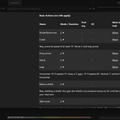
Pathfinder Dashboard is built around actually running a PF2e encounter instead of just looking things up. The left pane is a searchable, level-filterable creature browser; the centre is a combat tracker listing player characters and monsters with editable HP, AC, and condition columns; the top sets party size and level; and a meter along the bottom rates the current encounter's difficulty from Trivial upward as you add foes.
Behind a reference icon sits the quick-lookup side of the tool: a navigation strip jumps to tables for DCs by level, simple DCs, DC adjustments, accomplishment XP, cover, falling damage, terrain, environmental damage, climbing and demolishing DCs, conditions, death and dying, and the full list of basic and skill actions. A search bar handles spells and feats.
It is free and browser-based, and it is firmly Pathfinder 2e only. Among the tools here it is the one that most blurs the line between a GM screen and an encounter runner, so it suits a PF2e GM who wants reference and combat management in the same window.
Shieldmaiden
A Screen Wired Into Your Campaign
D&D 5eShieldmaiden's DM Screen pulls the pieces of a live session into one view rather than offering generic tables. It surfaces the campaign's prepared encounters (built in Shieldmaiden's encounter builder and run in its combat tracker) alongside a players panel that shows each character's current hit points, armor class, and stat modifiers, with controls to apply temporary hit points or AC changes to several players at once.
A resources area covers SRD 5.1 rules, conditions, monsters, spells, and items, and a soundboard supplies ambience and music to set the mood. Because the screen reflects your own campaign, encounters, and players, it requires an account and log-in to use.
This is the screen's strength and its limit at once: it is less a standalone reference than the dashboard face of the wider Shieldmaiden toolset, most valuable to GMs already running their 5e campaign inside that platform.
World Anvil
The Session Face of a Campaign Manager
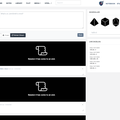
* PF 1e D&D 5e CoCWorld Anvil's storyteller screen is one part of its larger campaign manager and worldbuilding suite. During play it keeps notes, music, a dice roller, NPCs, statblocks, and quick peeks at player character sheets together in a single tab, so a GM can reference and run from the same place their prep already lives.
Its statblock reach is broad: the complete D&D 5e SRD and the Pathfinder SRDs are available, plus thousands of community statblocks and any homebrew you create for monsters, spells, items, classes, or races. World Anvil supports many systems, and it integrates with Foundry VTT to push notes and information to the virtual tabletop.
A free account is available, with paid tiers above it. As with Shieldmaiden, the screen is most rewarding when your world and campaign are already stored in the platform; used in isolation it offers less than its standalone counterparts.
The Thieves Guild
A Searchable 5e Reference With Generators
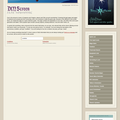
D&D 5eThe Thieves Guild's DM Screen is a long index of D&D 5e references with a keyword filter at the top: as you type "condition" or "jump", the list narrows to matching entries. Each entry opens its own page — the conditions link, for instance, leads to a full table of every condition and its effects.
Alongside the rules, it carries an unusual amount of generated content. The index covers carrying capacity, exhaustion, cover, light and vision, and travel, but also treasure hoard and individual tables, gem and art-object rolls, shop inventories by type, tavern and menu generators, name generators for several ancestries, random traps, and an NPC generator.
It is free and ad-supported and focused on D&D 5e. Because entries open as their own separate pages instead of expanding in place, it works more like a fast reference library than a single at-a-glance board.
Archives of Nethys
The Official Pathfinder 2e Rules, Consolidated

The Archives of Nethys GM Screen gathers the rules a PF2e GM reaches for most onto one page, drawn from the official rules the Archives hosts. It is organised as an accordion grouped under Basics, Skills, Environment, Gamemastering, and Reference Lists & Tables; clicking a heading such as Conditions or DCs by Level expands it in place to the full official text, complete with the cross-links used elsewhere on the site.
Sections cover basic and skill actions, conditions, death and dying, exploration activities, cover, falling damage, terrain, travel speed, encounter budgets, treasure by level, and DC tables. Everything is the canonical wording rather than a paraphrase.
It is free, ad-free, and read-only: there is no tracking, no generation, and nothing to save. For a GM who simply wants authoritative PF2e rules in one scrollable place, that focus is the point.
Choosing a GM Screen
The first question is whether you want a tool to act on or a page to read. 5e.tools, Kassoon, and Pathfinder Dashboard are interactive: build a board of statblocks and tables, frame your favourite generators, or run combat with a live difficulty meter. The Thieves Guild and Archives of Nethys are references you consult: the Thieves Guild broad and generator-rich for 5e, Archives of Nethys the official PF2e rules with nothing extra.
The second question is your system and ecosystem. Pathfinder Dashboard and Archives of Nethys are PF2e; the Thieves Guild and 5e.tools are D&D 5e; Kassoon leans 5e but its random content travels. Shieldmaiden and World Anvil are the integrated options, each turning a screen into the live face of a wider campaign platform, and both are strongest if you already work inside them. World Anvil additionally spans many systems and reaches into Foundry VTT. If you want one window that both references and runs your game, reach for an interactive dashboard; if you just want the rules to stop hiding, a reference will do.