4 Character Sheets Compared
A character sheet records everything that defines a player character: ability scores, hit points, armor class, skills, attacks, spells, and the gear and resources that change from one fight to the next. A digital character sheet does the same job as the paper version but handles the arithmetic for you: it works out skill and save bonuses, tracks current hit points and spell slots, and usually rolls dice on the spot.
This article covers character sheets you can use on their own, in a browser, without running a full virtual tabletop. That excludes the actor sheets bundled inside VTTs like Foundry and Fantasy Grounds, which only exist once you have a game world open. Most of these sheets need a free account before you can save your work, and a couple need you to be logged in just to open a sheet at all; that's noted below where it applies.
D&D Beyond
The Official 5e and 2024 Sheet
D&D 5e D&D 5.5
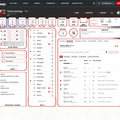
D&D 5eD&D Beyond's sheet is the official digital character sheet for fifth edition and the 2024 rules. The main panel shows ability scores, saving throws, the full skill list, armor class, initiative, walking speed, proficiency bonus, and passive Perception, Investigation, and Insight. Hit points sit at the top alongside Short Rest and Long Rest buttons, a Heroic Inspiration toggle, and panels for defenses and conditions. Tabbed sections below cover actions, inventory, features and traits, background, notes, and extras, and a dice roller is built in.
The sheet runs in a browser and in the D&D Beyond mobile app, with characters syncing between them. Editing happens in a paired character builder, and the sheet reflects the rules content tied to your account: characters can only use options from the free basic rules unless you own the relevant book.
A D&D Beyond account is required, and the free tier limits you to six saved character slots (the variant shown above). Paid Hero and Master tiers lift that cap.
Kassoon
One-Page 5e and 2024 Sheets

D&D 5e
D&D 5.5Kassoon takes the opposite layout approach: everything lives on a single scrolling page rather than behind tabs. You type ability scores directly into the sheet and it fills in modifiers, skill totals, and saving throws, with checkboxes for proficiencies and a global bonus field. Further down are an Attacks and Spells table, a spellcasting block with spell save DC, slots, and class-specific fields like ki points and martial arts, plus hit dice, death saves, a weight-tracking equipment list, and a currency tracker.
The sheet also pulls in racial and class feature text based on the class, level, and species you enter, so a Dragonborn's breath weapon or a Barbarian's unarmored defense appears written out on the page. A "Generate Character" roller and a Campaign Manager are tucked into collapsible sections at the top. The 2024 version is the same sheet built on the newer ruleset.
You can fill in and use a Kassoon sheet without an account, but saving, loading, and assigning a character to a campaign so a DM or other players can see it all require logging in.
Roll20
A Standalone Sheet Outside the VTT
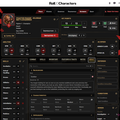
D&D 5e D&D 5.5 CoCRoll20 is a virtual tabletop, but its character sheet is now reachable on its own through the My Characters area, separate from any game. From there you build a character for a supported system, such as D&D 5e (2014 and 2024), Pathfinder 2e, or Daggerheart, and get a fully interactive sheet without ever launching a game canvas. The sheet handles hit points and rests, hit dice, clickable ability and saving throw rolls, armor class and speed, a defenses panel for resistances and immunities, conditions, and senses, organized into Combat, Skills & Tools, Spells, Inventory, Features & Traits, and Notes tabs.
Rolls can be made public, whispered, or set to automatic, and there's a roll log and an in-sheet compendium for rules lookups. Because it lives inside the Roll20 platform, a finished character can be carried into an actual game with the "Form a Game" option, or pulled in from a game you've already played. A Roll20 account login is required to open or build a sheet.
DM Toolkit
Stat Blocks Inside a Tracker

D&D 5eDM Toolkit is a free web app for running games, not a virtual tabletop, and its character sheet is built for the person behind the screen rather than the player. Each player character and monster is an entry in a per-campaign roster that feeds an initiative and combat tracker, storing name, owning player, initiative, current and maximum hit points, class assignments, and a prepared spell list.
Opening the "Character sheet" for an entry shows a read-only stat block (armor, hit points, speed, ability scores, damage resistances, senses, languages, challenge rating, proficiency bonus, and a list of actions) rather than an editable sheet you build a character on and play from. It works well as a reference during a fight but isn't a personal player sheet in the way the others here are.
It's a no-install web app with a demo you can try without an account, though demo data is wiped daily; keeping a campaign and its roster requires a free login.
Choosing a Character Sheet
For the most complete official fifth-edition experience, D&D Beyond is the natural pick, especially if you've bought books there, though the free tier caps you at six characters and limits you to the basic rules. Kassoon is the most open option: a single-page 5e or 2024 sheet you can start filling in immediately, with an account needed only when you want to save or share it. Roll20's standalone sheet makes sense if you're already using Roll20 and want a character that can later step into a hosted game. DM Toolkit is the odd one out; reach for it only if you're a DM who wants lightweight stat blocks attached to a combat tracker rather than a sheet for your own character.